Native SDK & Applications

Build the client experience you need without starting from zero.

Integrate our cross-platform native C SDK into an existing application, generate a branded app in about five minutes, or commission a custom build for more complex product, platform, and device requirements.

CloudTV PlatformApplication delivery
Branding · Content access · App configuration
Existing applicationIntegrate the native C SDKKeep your brand, interface, application architecture, and release process.
Shared foundationCommercial client foundationRefined through commercial use since 2011
Live playbackPlatform and accessCloudTV RXTHTTP BoostP2P Delivery
CloudTV or third-party media deliveryThe enabled application path determines which client capabilities are used.
45M+
Client installations worldwide
200+
Countries and regions
Since 2011
Commercial use since 2011

These figures describe cumulative commercial client deployment and geographic reach—not active devices, current users, or one unchanged software version.

Real-world client needs

Start with the application, playback, or access problem you need to solve.

Use the same commercial client foundation inside an existing product, a generated branded app, or a custom application—then enable only the platform, playback, transport, security, and connection capabilities the project requires.

01 · Enhance an existing application

Add mature client capabilities to the application you already operate.

When rebuilding the whole client would add time, cost, and migration risk.

You may already have an application, user interface, and business workflow but still need live playback, CloudTV Platform access, viewing authorization, subscription access, device policy, or transport for difficult networks.

Integrate the cross-platform native C SDK and enable only the required platform, playback, transport, and client-protection capabilities. Your existing brand, application architecture, main business experience, media system, CDN, and release ownership can remain.

Best suited to Live platforms with an existing app, businesses replacing or strengthening a player, existing clients connecting to CloudTV Platform, and operators that do not want to migrate the entire client product.
Existing applicationBrand · Interface · Business flow
Native C SDKPlatform · Playback · Access · Transport
Existing experience remainsTest and release through your current process
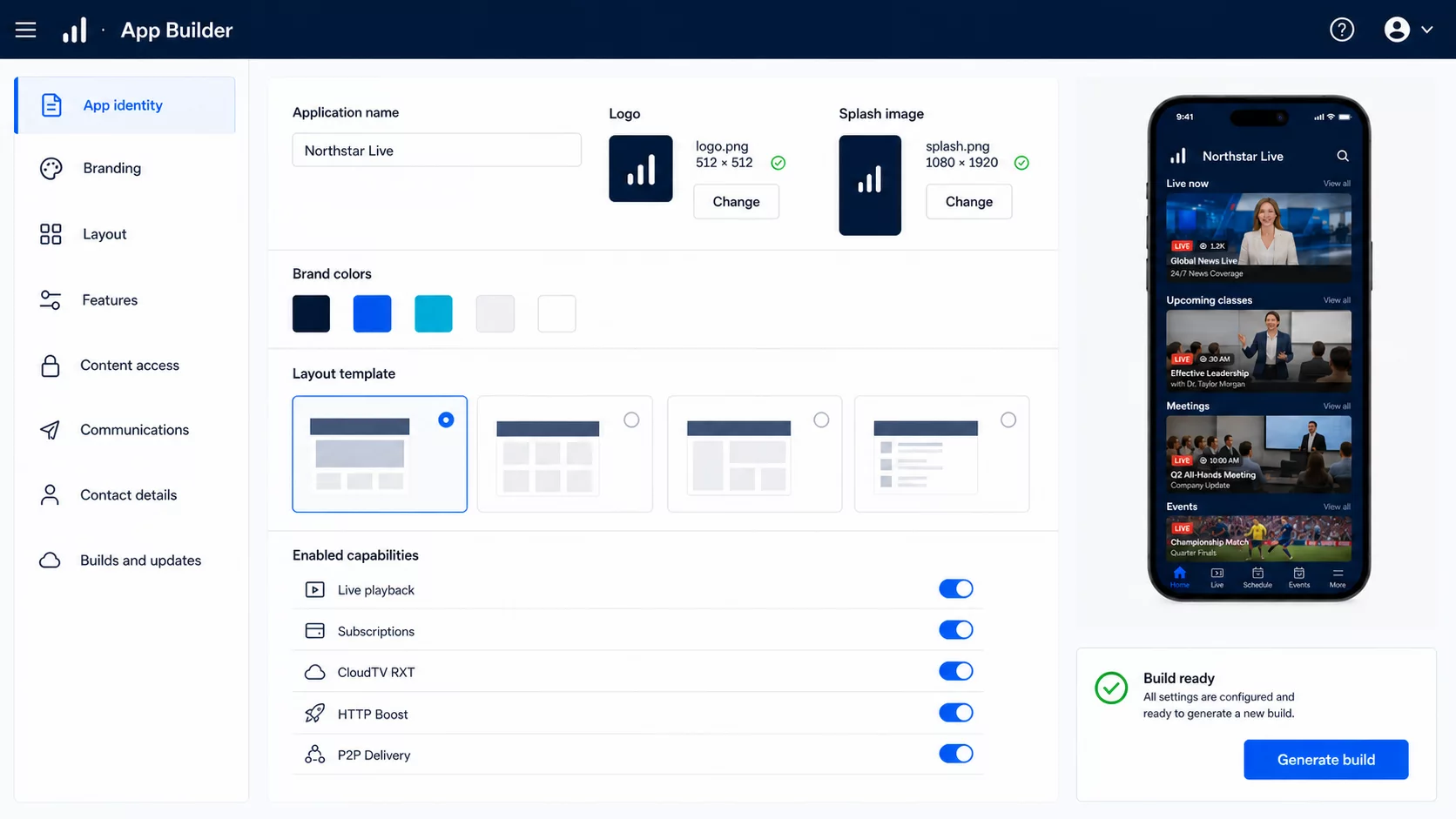
02 · Generate a branded app

Create a branded application without building the client from the beginning.

When the service needs its own client but does not have a full application team.

Content providers, education organizations, broadcasters, and smaller live teams still need their own brand, content entry points, accounts, subscriptions, and playback experience.

Configure branding, colors, application name, platform access, and enabled client capabilities in CloudTV Platform. The first branded build can be generated in about five minutes, then continues through customer testing, signing, store review, and publication.

Best suited to Teams launching a live service quickly, broadcasters and content brands, education, meeting and event services, and businesses without an independent client engineering team.
  1. Brand and application configuration
  2. Generate the first build About five minutes
  3. Customer testing and signing
  4. Store review or direct publication
03 · Custom development

Build around requirements a generated application cannot cover.

When the product, device, and release model need a purpose-built client.

Complex services may require a specialized experience, dedicated devices, hardware integration, enterprise authentication, custom payment workflows, unusual playback behavior, or platform-specific features that a generated application does not cover.

We design the application architecture and experience around the project, integrate the native SDK and CloudTV Platform where required, implement and test the client, and hand release control back to the customer.

Best suited to Live platforms with a distinct product design, televisions and set-top boxes, professional devices, hardware or enterprise integration, and complex cross-platform release requirements.
  1. Product and device requirements
  2. Architecture and experience design
  3. SDK and platform integration
  4. Custom implementation and testing
  5. Customer-controlled release
04 · Client-side delivery

Improve playback where the CDN alone is not enough.

When the final viewer route still suffers from loss, latency, QoS, or poor single-flow throughput.

A CDN can move a live stream closer to viewers, but cross-border routes, unstable access networks, and single-connection limits can still cause slow segment delivery and playback stalls. You may also want to keep the CDN already in place.

Use CloudTV RXT with a CloudTV edge for high-loss and high-latency routes, HTTP Boost with a compatible CloudTV or third-party CDN for faster HLS and DASH segment delivery, or P2P Delivery with any CDN as the source when participating viewers can exchange media.

Best suited to Applications serving global audiences, routes affected by QoS or single-flow limits, customers retaining an existing CDN, and live services with many concurrent compatible clients.
CloudTV EdgeCloudTV RXTRXT-enabled application
Compatible CDNHTTP BoostHLS or DASH application
Any CDN as originP2P DeliveryParticipating compatible viewers
05 · Protected playback requests

Keep copied playback links from becoming reusable access.

When a URL exposed inside an application can be copied or replayed elsewhere.

A playback link can be shared, embedded on another site, or replayed by an unauthorized client. The URL alone should not become a reusable access credential for paid, private, or licensed streams.

When used with a protected CloudTV CDN route, the SDK adds application and device identity to the playback request. CDN fingerprint authorization checks the request, lifetime, replay state, and session context before edge delivery.

Best suited to Subscription services, premium live streams, private events, licensed content, and services affected by hotlinking or URL sharing.
  1. Authorized SDK or App
  2. Device- and app-bound request
  3. CloudTV CDN fingerprint authorization
  4. Expiry, replay, and session checks
  5. Edge delivery

Fingerprint authorization requires a protected CloudTV CDN route. It is not biometric identification, DRM, encrypted HLS, or invisible watermarking. Public content does not force this viewer authorization path.

06 · Client environment protection

Keep protected playback inside approved applications and devices.

When modified packages or unapproved runtime environments target a restricted service.

Paid or controlled services can be abused through emulators, cloned applications, modified packages, and common runtime hooking or injection environments.

CloudTV client protection can check application identity, build integrity, device environment, and common signs of runtime modification before protected playback is allowed. Available checks vary by target platform and project configuration.

Best suited to Paid applications, licensed live content, controlled devices, reseller-distributed apps, and services targeted by modified clients.
  1. Application starts or requests playback
  2. Application and signature checks
  3. Device and runtime checks
  4. Configured access policy
  5. Allow, restrict, or report

These controls are designed to reduce abuse and make tampering harder, not to claim that any client is impossible to modify or compromise.

07 · Resilient name resolution

Keep the application connected when local DNS returns the wrong answer.

When a healthy service becomes unreachable because name resolution fails.

Polluted, hijacked, or unreliable local DNS can send login, subscription, API, and playback requests to the wrong address even while the service itself is operating normally.

The client can use independent DNS resolution, multiple configured resolvers, DNS over HTTPS, cached results, and managed fallbacks to reduce dependence on the device or network provider’s default DNS.

Best suited to Global applications, unreliable ISP DNS, incorrect regional resolution, and networks affected by DNS pollution or hijacking.
Application request
CloudTV DNS manager
  • Cached result
  • Alternative resolvers
  • DNS over HTTPS
  • Managed fallback
API or media endpoint

This improves name-resolution reliability; it is not a VPN or a tool for bypassing network restrictions. DNS fallback cannot restore a service when the destination IP or the complete network path is unreachable.

Commercial client foundation

Everything the client needs to connect, play and stay protected.

The native C SDK and CloudTV applications share the same commercial client foundation. Enable the playback, platform, transport, and protection capabilities required by each application.

CloudTV PlatformBranding · Content access · Subscriptions · Device policy
Refined since 2011Commercial client foundation
Platform access
  • Account access
  • Content discovery
  • Packages and plans
  • Subscriptions
  • Device access
Live playback
  • Live stream playback
  • Subtitle selection
  • Track selection
  • Playback continuity
Delivery
  • CloudTV RXT
  • HTTP Boost
  • P2P Delivery
Client protection
  • Application and device identity
  • Integrity and runtime checks
  • CDN fingerprint authorization
  • Independent DNS and fallback
Existing applicationGenerated branded appCustom developmentThe same client foundation

Three ways to build

Start with the application you have—or the one you need.

Integrate the client foundation into an existing product, generate a branded application from CloudTV Platform, or commission a custom build around more complex product and device requirements.

Native C SDK

Add CloudTV capabilities without replacing your application.

  1. Existing application
  2. Integrate the native C SDK
  3. Enable required platform, playback, and transport capabilities
  4. Test within the existing product
  5. Release through the customer’s current process
What you keep
  • Brand and interface
  • Application architecture
  • Existing business workflow
  • Current CDN or media system
  • Release ownership
What you add
  • CloudTV Platform access
  • Live playback
  • Subscriptions and device access
  • RXT, HTTP Boost, or P2P when required
  • Client protection and resilient DNS
Commercial client foundationRefined through commercial use since 2011

Application operations

Manage the application after it reaches your users.

Every device using the CloudTV SDK or a CloudTV application can register with your platform. Manage client configuration, content access, devices, customer communications, and application updates from the same operation.

SDK applicationGenerated AppCustom application
Device registrationIdentity · Access · Enabled services
CloudTV Platform
App experience

Feature visibility · Page layout · Splash and branding · Contact information

User communications

Help content · Announcements · Promotions · Device or group MQTT messages

Devices

Registration · Access state · Application version · Activity and ownership

Application lifecycle · Configuration · Builds · Updates
Native SDK

Keep application operations in your existing system.

The application and its devices connect to CloudTV Platform for identity, access, and enabled services. Use CloudTV APIs only where required.

Generated App

Manage the complete branded application lifecycle.

Manage branding, layout, visible features, help content, announcements, promotions, devices, and updates from CloudTV Platform.

Custom application

Choose the management relationship the project needs.

Use a CloudTV-managed lifecycle or connect only the required SDK, device, and access services while application operations remain in your own platform.

Generated App update flow
  1. CloudTV application core update
  2. Rebuild the customer-specific application
  3. Publish the new version
  4. Notify eligible registered devices
  5. Client upgrade

An application-core update does not bypass testing, signing, store review, or the customer’s release process.

A better route for every viewer.

Keep live media moving across difficult networks.

Use CloudTV RXT when ordinary connections cannot keep up with a difficult route. Use HTTP Boost to improve segmented playback from an existing CDN. Add P2P Delivery when compatible viewers can help deliver the same live stream to one another.

CloudTV RXTHigh-loss and high-latency routesCloudTV edge ⇄ RXT-enabled application
HTTP BoostFaster HLS and DASH playbackCloudTV or third-party CDN → enabled application
P2P DeliveryViewer-to-viewer media deliveryCDN and suitable peers → enabled application
Bidirectional client transport
  1. CloudTV edge
  2. CloudTV RXT
  3. RXT-enabled application
  • Bidirectional transport
  • Publishing and playback
  • High latency and packet loss
  • Cross-region routes

How RXT works

CloudTV RXT coordinates sending, acknowledgement, retransmission, and loss recovery between an enabled application and the CloudTV edge. This gives both sides greater control over the difficult part of the route when latency and packet loss make a standard connection unable to sustain the required bitrate.

The same client transport can be used for live publishing, playback, or bidirectional transfer. Beyond the edge, the route can continue to a media service, CDN, platform, or another destination through its configured delivery protocol.

Available through the CloudTV native SDK, CloudTV applications, CloudTV RXT Proxy, or another compatible RXT-enabled endpoint.Explore Resilient Transport →

HTTP Boost

Improve playback without changing your CDN.

HTTP Boost keeps reusable connections ready for your CDN, follows the viewer’s real playback position, prepares upcoming HLS or DASH segments, fetches coordinated byte ranges within each segment, and recovers only missing data. This reduces buffering without replacing a compatible CDN or changing the stream.

Works with CloudTV CDN or compatible third-party CDNs that support standard HTTP byte-range requests.

Reusable connections

Keep a healthy route ready for the next request.

Opening a new TCP connection adds network round trips before media can move. HTTP Boost keeps a reusable pool of healthy CDN connections and shares them across manifest, key, and segment requests.

If a pooled connection was closed before a response begins, the request reconnects and is sent again. Unusually slow connections leave the pool so they do not continue delaying later segments.

Playback-aware read-ahead

Discover and prepare media before the player needs it.

HTTP Boost refreshes the HLS or DASH manifest in the background and follows the viewer’s real playback position. Playback progress, segment speed, and locally available data determine how far the scheduler reads ahead.

A prepared segment is served from the local buffer. If preparation is still running, the player joins that task instead of downloading the segment again. Read-ahead continues as new segments enter the live window.

Parallel delivery inside each segment

Use several connections for coordinated ranges of one segment.

After confirming segment size and byte-range support, HTTP Boost divides that segment into coordinated byte ranges, fetches them across multiple connections, and restores the data in original byte order.

This happens inside each media segment—not by simply requesting several complete playlist entries. It helps when single-flow QoS, a poor flow, or a temporary path black hole constrains one connection.

Retry only what is missing

Keep completed data when one range slows or fails.

A failed or stalled byte range can be retried or raced through another connection while every completed range remains in the local buffer. Several slow ranges affecting current playback can be recovered together.

After the active recovery window is used, HTTP Boost stops adding competing connections and leaves one recovery request on the missing range. The segment completes when every range is available in order.

HTTP Boost uses standard HLS and DASH media delivery. The CDN or origin must provide stable HTTP byte-range responses for media segments.

Existing CDNReusable connections
Live manifestPlayback-aware schedulerN+1 · N+2 · N+3
One media segmentCoordinated byte ranges
Ordered local bufferPlayer

Keep healthy CDN connections ready for the next request.

Where HTTP Boost saves time.

Connection reuse, read-ahead, and parallel segment delivery move network wait away from the playback path.

Recorded comparison · 1 September 2026 · Build 1360509 · 178 ms configured RTT · 1% configured loss in each direction · 2 Mbit/s per-flow path limit · 6.5 MiB segment · 5 runs per mode · 120-second completion limit
HTTP Boost stage-by-stage comparison with ordinary single-flow playback
StageOrdinary single-flow playbackHTTP BoostPlayback effect
Connection setupOpen a connection when the player requests dataKeep healthy upstream connections available for reuseAvoid a new setup round trip when a connection can be reused
Manifest and segment discoveryRefresh when the player asks for the next mediaRefresh and parse ahead of playback, then schedule upcoming segmentsMove discovery and useful transfer work ahead of the playback deadline
Same-segment transfer27.52 s median
27.52–27.52 s · ordinary download · 5/5 complete
3.26 s median
3.05–4.28 s · 8 coordinated ranges · 5/5 complete
88.15% less transfer time in the recorded same-route comparison
Against a 10-second playback window17.52 s late
Derived from the measured median transfer time
6.74 s early
Derived from the measured median transfer time
The segment can be ready before playback reaches it
Slow or stalled flowOne flow can delay the whole segmentRetry or race only the missing range while keeping completed dataLimit recovery to the data that is still missing

HTTP Boost does more than download a segment faster. It keeps the route warm, discovers upcoming media earlier, overlaps transfer with playback, and limits recovery to the data that is actually missing.

The recorded comparison measures ordinary single-flow and HTTP Boost transfer of the same segment under a per-flow QoS limit. Connection reuse, playback-aware read-ahead, and range recovery are product mechanisms but were not timed separately. Actual performance varies by route, CDN, workload, and configuration.

P2P Delivery

Let viewers help deliver the stream to one another.

When P2P Delivery is enabled, each authorized application connects to the CloudTV P2P tracker for peer discovery. When suitable viewers using the same enabled application are watching the same stream, their clients can exchange available live media data directly.

The CDN remains the original source and fallback for startup, missing data, or times when suitable peers are not available. With enough participating viewers, the application can receive media through more than one delivery path, improving playback continuity while reducing repeated CDN traffic and delivery cost.

  1. 01 · Authorize the viewer

    The application completes the normal account, subscription, and content-access checks before the viewer joins delivery for the stream.

  2. 02 · Discover suitable peers

    The authorized application connects to the CloudTV P2P tracker, which discovers compatible viewers using the same enabled application and watching the same live stream.

  3. 03 · Exchange available media

    When network and peer conditions are suitable, participating clients exchange available live media data directly. The tracker coordinates discovery; it does not carry the live media itself.

  4. 04 · Keep the CDN available

    The CDN supplies startup data, fills anything peers do not have, and remains the delivery path whenever suitable peers are unavailable.

CloudTV P2P trackerPeer discovery and coordination
Viewer AViewer BViewer C
CDN sourceStartup · Missing data · Fallback
  • The same enabled application
  • The same live stream
  • Authorized participating viewers
  • Suitable network and peer conditions
More available delivery pathsSmoother playback during CDN or route fluctuationsLess repeated traffic from the CDNLower CDN delivery cost at scale

The tracker discovers and coordinates peers; it does not serve the live stream. When suitable peers are unavailable, playback continues from the CDN as usual.

Fit your existing stack

Keep the systems you already operate. Add the client layer you need.

Integrate the native C SDK into an existing application, generate a branded app managed from CloudTV Platform, or connect a custom application to only the platform and delivery services the project requires. Your existing media system, CDN, business workflow, and release process can remain in place.

Application pathChoose how to adopt the client layerExisting application · Generated App · Custom application
Client layerNative SDK & ApplicationsCommercial client foundation · Platform access · Playback · Transport
Delivery choicesUse the path each application needsCloudTV RXT with CloudTV Edge · HTTP Boost with a compatible CDN · P2P with suitable peers
CloudTV PlatformBrandingContent accessSubscriptionsDevicesApp operations
Shared platform

CloudTV Platform

Application identity · Enabled services · Devices · Configuration · Health

Optional business operations

Business Management

Content · Plans · Subscriptions · Customers · Resellers · Device policy

Optional live processing

Live Media Core

Relay · Protocol conversion · Transcoding · Live Subtitles

Optional CloudTV delivery

Global Edge CDN

Live delivery · Fingerprint authorization · TCP Boost · RXT edge path

Optional transport detail

Resilient Transport

RXT endpoints · Difficult-route workflows · Controlled test evidence

Optional protection

Rights Protection

Encrypted HLS · DASH with DRM · Invisible watermarking

Native SDK integration does not require you to replace an existing media server, CDN, application operation system, or release process. CloudTV RXT requires a CloudTV edge; HTTP Boost can use a compatible CloudTV or third-party CDN; P2P Delivery can use any CDN as the source and exchanges media only between participating compatible clients.

Plan the client

Tell us what the application needs to do—and what you already have.

Share your target platforms, existing application or media stack, branding, playback formats, business workflows, difficult network conditions, security requirements, and release process. We’ll help determine whether the native C SDK, a generated branded app, or custom development is the right starting point.

Discuss your application