Your media stack
Existing origins, streaming servers, CDN, applications, and payment gateway can stay in place.
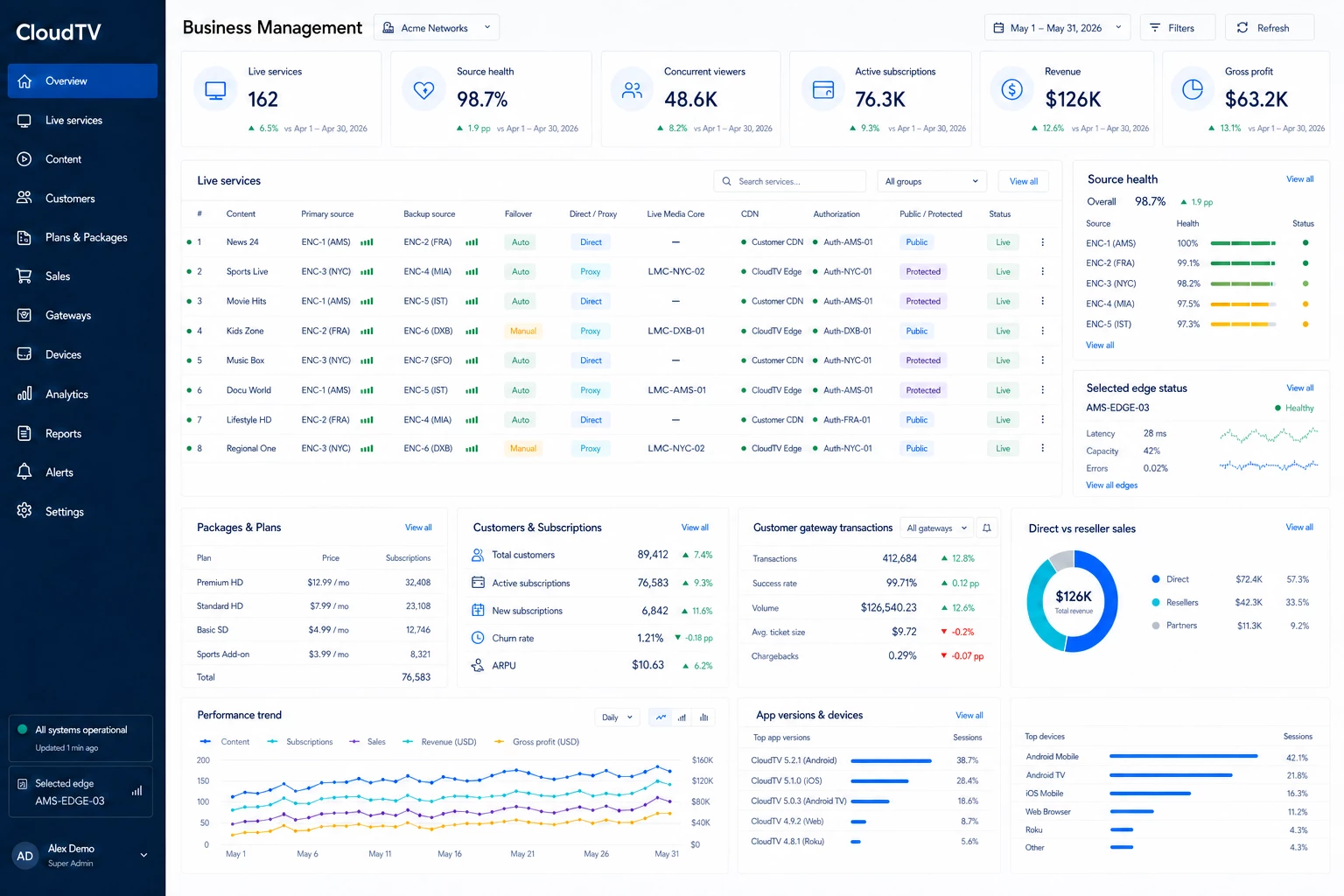
Business Management
Manage how live content is sourced, published, sold, and delivered, together with the subscribers, devices, payments, and analytics behind it. Use your own streaming infrastructure, CloudTV products, or both.
Customers Devices Usage Sales Revenue analytics
One platform, clear product boundaries
Business Management organizes the service. Media processing, live delivery, and native playback remain separate products that you enable only when a route needs them.
Existing origins, streaming servers, CDN, applications, and payment gateway can stay in place.
Live Media Core, Global Edge CDN, Live Subtitles, and Native SDK & Applications connect through the same content record.
From source to viewer
Add one or more source addresses, or create a push input. Keep the stream direct, or run it through Live Media Core when you need processing, subtitles, or additional outputs. Then decide how viewers receive it and who can watch.
The original source remains the viewer destination.
The unified entry resolves the current source; media does not enter a CDN edge.
The live output is served from the edge receiving and processing that stream.
Viewer location, edge health, and load determine the delivery edge.
Content and commercial structure
Packages organize content. Plans define what customers buy.
Source · media path · publishing · access · playback
Organize one or more live services for use in offers.
Every paid or trial activation becomes a customer subscription.
Follow the relationshipsOpen any record to see what stays connected.
Sell and activate access
Let resellers activate access, connect your own storefront through the API, use a hosted subscription page, or sell inside your SDK or branded application.
A reseller provisions the viewer’s subscription directly.
Complete checkout in your storefront, then activate through the CloudTV API.
Offer a ready subscription path connected to your selected plans.
Let viewers subscribe inside the application they already use.
Create a trial subscription when the Plan allows it and the customer is eligible.
All enabled routes create a Subscription
Apply campaign rules to eligible Plans across your supported checkout paths.
Connect your payment gateway and manage subscriber transactions from the same workspace.
Customer and device operations
Keep the customer, the Plan they can use, their active Subscription, registered devices, and the sales channel that created or renewed access connected in one operating record.
Let authorized resellers create or renew customer access while the service owner keeps Plans, customer relationships, and reporting visible.
Configuration at the right level
Apply common publishing, access, and playback settings across your service. When a live stream needs a different route or policy, its content-level settings take precedence.
Configuration cannot bypass product subscriptions. Proxy still requires Live Media Core; CDN publishing still requires Global Edge CDN.
Connected product views
Configure media and publishing from the business workflow, then use each product view for its specialist controls and operating state. The record stays connected across the platform.
The same content record appears in every enabled product view. Product-specific controls remain in their specialist view; the record does not need to be created again.
Application operations
Devices using a compatible Native SDK, Generated App, or connected Custom Application register to the same customer workspace. Business Management connects app configuration and communication with the customer, subscription, content, and device records that already run the service.
This is the shared foundation. Native SDK and customer-managed applications can stop here and keep their existing interface, operations, and release system.
Set the app name, icon, splash and banner artwork, language, contact details, purchase link, layout, and visible features.
Branding · languages · layouts · feature visibilityPublish help, announcements, and promotions. Dynamic splash and campaign content can change without rebuilding the app; messages can target a device, group, or audience.
Help · announcements · promotions · messagingManage registration, ownership, groups, access state, and the device or concurrent-session rules inherited from each customer’s Plan.
Registration · ownership · groups · access policyTrack customer-specific builds, versions, release notes, and automatic or required updates while preserving customer signing and release control.
Build status · versions · release policy · updatesFollow downloads, new registered devices, client versions, acquisition source, and geographic distribution for each application.
Downloads · devices · versions · source · regionChoose the management boundary
Generate a branded application from the platform, typically in about five minutes after its build configuration is complete.
About five minutes covers the first generated build. Testing, signing, customer approval, app-store review, and publication are separate steps.
Connect identity, devices, access, and the business APIs you need without moving the rest of your application operations.
Run the application through Business Management, or connect core access and device services while your own platform manages the experience.
Operations and built-in analytics
Use the current operating state to handle today’s service, then use period-based analytics to understand viewing, customers, sales, offers, and application distribution over time.
Current state and operational records for the service your team is running.
Primary and backup source state, automatic failover, Direct or Proxy path, enabled outputs, CDN publishing, authorization, and Public status.
Current and concurrent viewing, authorization results, active devices, customer entitlement, and applied device limits.
New and renewed access, reseller activations, customer payment-gateway transaction history, refunds, and current Subscription status.
Slow or broken playback feedback, source interruptions, fallback events, device activity, and the client version currently in use.
| Analytics view | What it answers | Measures and breakdowns |
|---|---|---|
| Content and playbackViewing analytics | Which live services people watch, where playback happens, and where the viewing experience needs attention. |
|
| Customers and devicesSubscriber and device analytics | How the viewer base changes over time and how subscribed and non-subscribed devices use the service. |
|
| Subscriptions and salesSales and subscription analytics | Which offers and sales channels generate orders, renewals, revenue, and Gross profit. |
|
| Offer performancePackage and Plan analytics | Which content combinations and commercial Plans attract, retain, or lose subscribers. |
|
| Applications and distributionApplication and distribution analytics | How each application reaches new viewers and which client versions remain active in the field. |
|
Your service, your stack
Tell us what you already run and what you need to operate next.